LAMO Creator

Coming soon for iPhone & iPad

Big ideas.
Little clips.
All yours.

A craft. A mini movie. A drawing coming to life. Record your idea, make the edit, and find your own style—with no social feed to keep up with.

Let's make something

Your own video studio. No account. No feed.

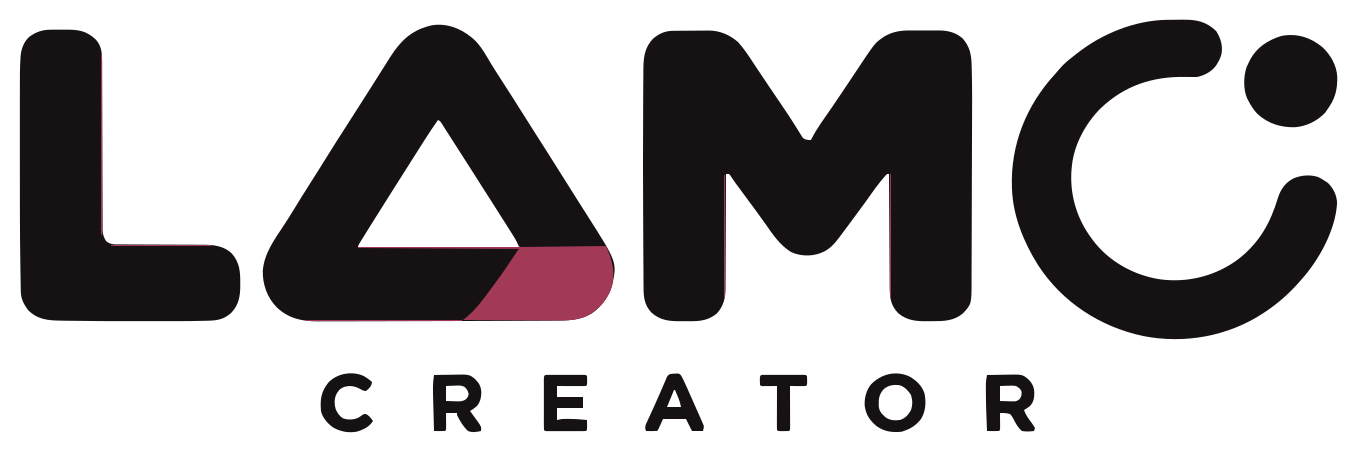
Illustrative home video studio with a phone mounted above a nail-art workspace, showing LAMO Creator’s camera controls.
Room to experiment.It doesn't have to be perfect.
RECORDREMIXREVEALREPEAT

An idea. A few clips. A little wow.

You bring the creativity.
We'll help with the video.

01THE TAKE

Set the scene.
Get in the frame.

Pick a countdown and set your clip length. Start the take, get into position, and let recording stop on its own. Keep your hands on your craft, your drawing, or your next big idea.

Take two? Redo a clip and try again.

02THE SWITCH-UP

Line it up.
Make the switch.

A faint peek at your last frame helps you line up the next one. Keep your scene in place, change one thing, and turn a few simple clips into a satisfying reveal.

Grid and hand guides help line things up.

03THE BIG REVEAL
Speed
0.5×
Look
Glossy
Transition
Flash

A little snip.
A lot of you.

Trim the waiting-around bits, split a clip, and put your moments in the order you want. Slow down a detail or speed up a step, then finish with a color look and a transition.

From 0.5× slow-downs to 8× fast-forward.
Crafts, drawings, toy stories, nail art. What will you make next?

The finishing touches are yours

Your words.
Your sound.
Your story.

A few thoughtful tools to help your video feel like you.

SOUND

Find your video's mood.

Choose from four original LAMO sound loops. Mix the added sound with your video’s own audio, or mute either one. Want to tell the story yourself? Record a voiceover while you watch your edit.

TEXT & EFFECTS

Say it your way.

Add a title, a little explanation, or a line of your story right on a clip. Choose a text style and position. Add a little sparkle, floating hearts, bokeh, bubbles, or a soft glow. The effects are yours to choose.

BEFORE & AFTER

Two moments. Side by side.

Show your first and last clips together. A blank page and the finished drawing. The pieces and the build. A little progress worth seeing.

A space for making stuff

All you.
Zero scroll.

No feedNo followersNo ads

Your ideas deserve a little collection.

Name your projects, watch them back, and keep trying new things. Your projects stay in Creator. Save a finished copy to Photos whenever you choose.

Made something you love? Tap Save to Photos to keep a finished copy. Your project stays ready for the next edit. Or just keep creating for you.

More about your privacy

For parents & curious creators

A few good
things to know.

Simple tools for making videos, with room to experiment and no social feed to keep up with.

Visit Creator support
What do I need to get started?

LAMO Creator is being tested on TestFlight for iPhone and iPad running iOS or iPadOS 26 or later. The public App Store release is coming soon.

Recording needs camera and microphone permission. Find good light, use a steady phone or tablet stand, and pick a countdown that gives you time to get ready.

Is there an account or social feed?

No account, social feed, ads, or in-app purchases. Recording and editing work offline. LAMO Creator doesn't send your videos to us or track what you make.

How does saving work?

Tap Save to Photos to add a finished copy to your Photos library. The first time, iOS asks whether Creator may add to Photos. Creator never reads your Photos library.

There is no messaging or sharing inside Creator and no in-app parent-approval step. Families manage Photos, iCloud Photos, and any sharing from Photos through their Apple settings.

Where are videos saved?

Projects stay inside LAMO Creator, separate from Photos. They aren't synced or included in device backups. Save finished videos to Photos when you want a separate copy. That copy is not a backup of the editable project.

Deleted projects stay in Recently Deleted for 30 days, so you have time to put them back. Permanently deleting a project or deleting the app removes its stored videos. We don't have a server copy to restore.

Your next idea looks good on you.

Make it.
Make it yours.

Coming soon on the App Store

For iPhone & iPad · iOS / iPadOS 26+